Back to Templates
TEMPLATE · SERVICE

KAIROSS MAIL

CUSTOM MAIL SERVER ON YOUR OWN DOMAIN

Your own email on your own domain: no per-seat fees, your data on your server. Unlimited mailboxes and aliases, webmail with calendar and contacts, and every mail app you already use.

The demo is our own login page at mail.kaiross.in. See the case study

Kaiross Mail cover art: a server tower with a padlock and an envelope flying out of it, beside chips for SMTP, IMAP, TLS and webmail

As deployed on mail.kaiross.in

5
Protocols open
3
DNS records
1
Domain
TLS
Let's Encrypt

WHAT YOU GET

A mail server set up, secured and handed over, or run for you

Unlimited mailboxes & aliases

As many addresses as your domain needs, on one or several domains, with no seat counted or charged.

Webmail, calendar, contacts

SOGo groupware in the browser: mail, shared calendars and address books, no desktop app required.

Any mail app, via autoconfig

Thunderbird and Outlook find the server settings themselves from the autoconfig file; phones take the same host and port.

Spam & virus filtering

Inbound mail is scanned and scored before it reaches an inbox.

DKIM, SPF, DMARC

The three DNS records that decide whether your mail is trusted, published and verified at launch.

TLS everywhere

Webmail, SMTP and IMAP all speak TLS, with certificates issued and renewed automatically.

Daily backups

Mail storage and server configuration backed up daily, restorable to a fresh host.

Admin panel

A web UI for mailboxes, aliases and domains, so adding a colleague is a form, not a ticket.

DELIVERED, NOT SPAM-FOLDERED

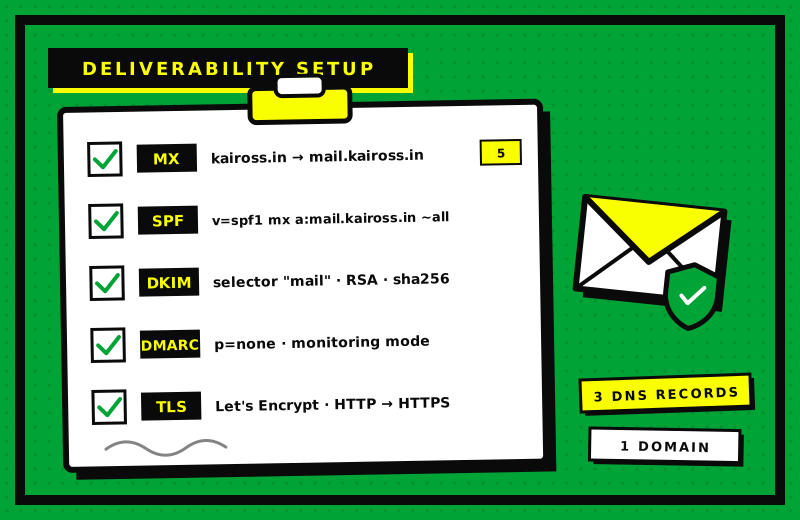
A mail server is only as good as its DNS. These are the records we publish for your domain, exactly as they stand for kaiross.in today.

A clipboard with five ticked rows: MX, SPF, DKIM, DMARC and TLS, beside an envelope with a shield

MX

Points the domain at the server: kaiross.in → mail.kaiross.in, priority 5.

SPF

Names who may send for the domain: v=spf1 mx a:mail.kaiross.in ~all.

DKIM

An RSA key on the selector mail, SHA-256, signing every outgoing message.

DMARC

Published with p=none: monitoring mode first, so reports arrive before any policy is enforced.

WORKS WITH EVERY MAIL APP

Five protocols open on the host, and an autoconfig file at /.well-known/autoconfig/mail/config-v1.1.xml so Thunderbird and Outlook set themselves up.

WebmailCalendarContactsAdmin panelAutoconfigDNS recordsTLS certificatesBackups

QUESTIONS

How does a self-hosted mail server compare with Google Workspace or Zoho on cost?
Hosted suites bill per mailbox per month, so the bill grows with every seat and with every role address you want as a real inbox. A self-hosted server is one flat server cost however many mailboxes and aliases you create on it. For a very small team the two can be close; the gap opens as the team grows, or the moment you need dozens of addresses that a suite would count as seats.
Will our email actually be delivered, or land in spam?
Deliverability is DNS work done properly. We publish an MX record for the domain, an SPF record naming the server, a DKIM key that signs every outgoing message, and a DMARC policy that starts in monitoring mode so you see reports before anything is enforced. TLS on every connection completes it. That is the same setup running on mail.kaiross.in today.
Can we migrate from our current provider?
Yes. Existing mailboxes are copied over IMAP, so folders and history come across, and you keep every address because the domain is yours. The cutover is a change to the MX record; until then the old provider keeps receiving.
What about backups?
Daily backups of mail storage and server configuration are part of the service we set up, restorable to a fresh host. Your data lives on your server, and a copy of it lives somewhere else.
Who administers it after launch?
Either of us. The admin panel is a web UI for mailboxes, aliases and domains, so a non-technical owner can add a mailbox without touching a terminal. Kaiross can also run it for you as a managed service, with updates and monitoring, or hand it over with documentation.

YOUR DOMAIN, YOUR MAIL

Tell us the domain and how many people need a mailbox. We set the server up, publish the DNS, move the existing mail across and hand you the admin panel.